Headroom, Round Two: Four Walls Between Me and a Working Token Saver
Three days ago I wrote an autopsy about ripping a dead Headroom integration out of my 9router fork. The endpoint I was calling didn’t exist in the version I was running, the failure was swallowed silently, and the cleanest fix was deletion.
Four walls later, it actually worked. I expected the bug to be another version mismatch. It wasn’t. Not once.
The Setup
I switched to a branch tracking upstream 9router v0.5.50. I’d previously been running a fork with custom providers, but v0.5.50 now ships a full Headroom integration natively. I cherry-picked my custom combos import/export ports into this branch; RTK compression was already upstream. See my notes on v0.5.50 for the full breakdown of what shifted.
The integration includes Python detection (lib/headroom/detect.js), process lifecycle management (lib/headroom/process.js), management routes, and an embedded proxy. Infrastructure management, not a feature flag.
I flipped the toggle. It didn’t work. Of course it didn’t.
Wall 1: The Invisible Install
I had installed Headroom via pipx. The dashboard insisted it wasn’t installed.
The detection logic probes a list of Python interpreter candidates — Homebrew paths, framework installs, user-local paths — and runs pip show headroom-ai against each one. It needs the package visible to a probed interpreter; a headroom binary sitting on PATH isn’t enough, because the dashboard also uses that interpreter to manage the proxy. pipx installs into its own isolated venv, so every candidate interpreter answered “no such package.” The install was real; it was just invisible to every Python the dashboard could see.
Uninstalled from pipx. Cleared the stale PID and log files left in ~/.9router/headroom/ from my earlier manual-proxy experiments. Started over.
The fix for Wall 1 turned out to be Wall 2.
Wall 2: The PEP 668 Wall
The dashboard has an install button. It runs pip install headroom-ai[proxy] for you. On a modern Homebrew-managed macOS Python, that fails instantly:
1
error: externally-managed-environment
PEP 668 marks the whole environment externally managed — pip refuses to install into it at all, even with --user. That’s the protection that makes the “just click install” button a dead end on this setup.
The workaround that made detection happy:
1
2
# Run using an interpreter on the detection probe list (paths vary by machine)
/opt/homebrew/bin/python3.12 -m pip install --user --break-system-packages "headroom-ai[proxy]"
--break-system-packages is a deliberate footgun flag, used here with eyes open — it overrides the PEP 668 guarantee, which might impact future system-level updates for that interpreter. --user steers the install into the site-packages where the detection logic actually probes. That lands headroom-ai 0.34.0 exactly where the dashboard looks.
Wall 3: The Binary Nobody Could Find
Installed, detected — but the headroom binary itself lands in ~/Library/Python/3.12/bin, which wasn’t on the dashboard’s extended PATH. A status check in the dashboard returned a binary not found error, pointing me to the missing location. A symlink into ~/.local/bin — which is on the extended PATH — closed the loop.
Dashboard now reports: Headroom running, v0.34.0. Three walls down.
Wall 4: The Broken Embedded Dashboard
Headroom ships its own dashboard, and 9router proxies it at /api/headroom/proxy/dashboard. Mine rendered as unstyled text soup.
The proxy rewrites Headroom’s HTML so its URLs resolve through the Next.js app — but only fetch(' calls, and only on the dashboard root page, not sub-pages. Headroom 0.34.0’s HTML loads Tailwind, htmx, and Alpine with root-relative script tags, and links its settings page the same way:
1
2
<script src="/dashboard/static/tailwind.min.js"></script>
<a href="/dashboard/settings">
Every one of those 404’d against the Next.js app — no Tailwind, hence the text soup. The fix was a second rewrite pass for src/href attributes, prefixing them with the proxy mount point (DASHBOARD_PREFIX = "/api/headroom/proxy"), plus applying the rewrite to sub-pages too:
1
.replace(/(src|href)="(?=\/dashboard(?:\/|"))/g, `$1="${DASHBOARD_PREFIX}`)
Styled dashboard. Then I clicked into Settings and got Failed to load settings: HTTP 404 — the settings page fetches /settings, /settings/schema, and /settings/apply, and the fetch-rewrite allowlist didn’t include settings. One allowlist entry later, the whole embedded UI worked.
Both dashboard fixes are open as PR #3065, alongside a combos import/export port from my fork.
The Receipts
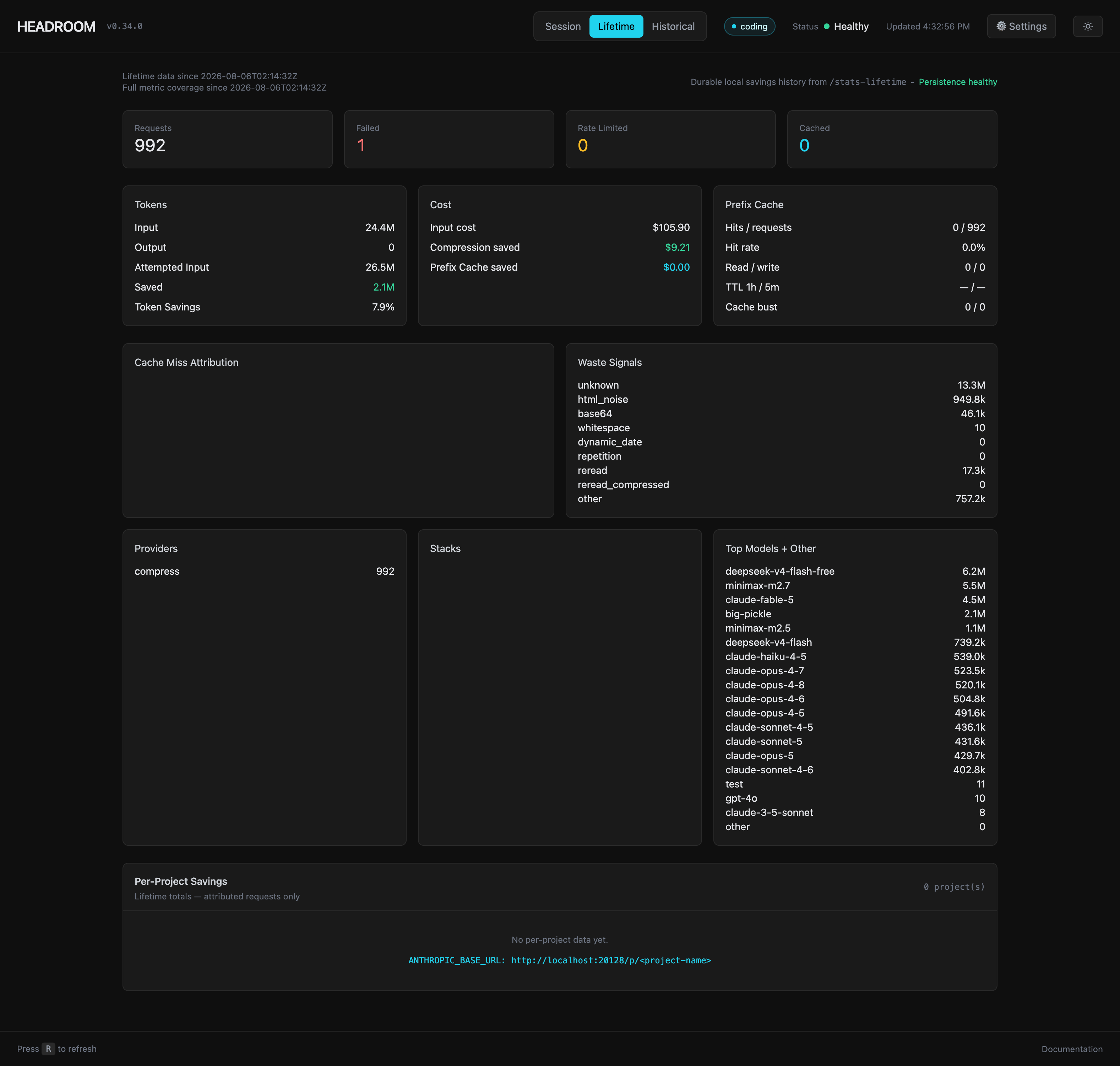
Last time the lesson was “check if it’s actually running.” So this time, proof. The dashboard reports 992 requests compressed with 2.1M tokens saved — modest numbers, because I cap the token-input limit: requests above the cap skip compression entirely, a tradeoff that keeps the proxy fast. Here is the proof-of-life:
- 21 requests compressed in this session, zero failed
- 69,627 tokens stripped out of 622,745 — 11.2% average
- Best single request: 10,798 → 8,559 tokens (20.7%)
- ~$0.56 saved on the session, per Headroom’s own cost accounting
Not life-changing money. But it’s real, it’s measured, and it’s per-request visible in a dashboard that now actually renders.
What Round Two Taught Me
The autopsy’s lesson was check the version before assuming the API exists. Round two’s lesson is subtler: the hard part of shipping a sidecar isn’t the sidecar — it’s the environment detection around it.
Every wall lived in the seams:
- Package manager isolation (pipx) defeating interpreter probing
- OS-level packaging policy (PEP 668) defeating the one-click installer
- PATH assumptions defeating binary discovery
- Root-relative URLs defeating the reverse proxy
The first three aren’t code bugs — Headroom, 9router, pipx, and PEP 668 are each doing their job; the failure lives where they meet. (Arguably 9router could smooth those seams — pipx awareness, a PEP 668 fallback in the installer — but that’s a different PR.) The fourth was squarely a 9router proxy bug, which is why that one went upstream. All four only surface on a real machine with a real Python mess, which is to say: everyone’s machine.
The token saver is on. The dashboard renders. And this time, when a request goes through, there’s an actual number to prove it.